Stop building simulation. Start running it.
Forge builds the twin: the site, your robot and its sensors. It drafts the scenarios and edge cases that break mobile robots, runs your navigation stack exactly as it ships, and hands your engineers a root cause instead of a symptom. Built for teams shipping autonomous forklifts, pallet movers, tuggers and goods-to-person AMRs.
The builder's problem
Simulation is worth it. Building it isn't.
Every mobile-robot team knows it should test in simulation before the field. Most end up maintaining a simulator instead of running one: the scene, the robot model, the sensor stack and the scenarios all take specialists, and all of it rots the moment the site or the robot changes.
Sim scene stood up for customer site ATwo engineers, one sprint
Scenario suite hand-written12 cases · the ones someone thought of
Customer site B looks nothing like AScene rebuilt · suite half-adapted
Release 3.2 ships12 of 12 pass
Field: person steps out behind a rackNot one of the 12. Found the expensive way.
to stand up a realistic scene, robot and sensor stack
Before a single scenario runs, and again for every new customer site.
assets, sensor models and scenarios
Maintained by the people you'd rather have on the product.
the edge cases nobody had time to write
Every variation is authored by hand, so the suite covers what someone remembered.
regressions between releases
What passed in 3.1 quietly breaks in 3.2, and nobody re-ran the case that would have caught it.
Forge keeps your simulation engineers on the problems that need them, and takes everything else off their plate: the scene, the assets, the sensor models, the scenario scaffolding and the first pass at root cause.
// 01 Forge builds your world
Your customer's site and your robot, built by Forge, checked by your engineers.
Describe the site or import a walkthrough video, and import your robot. Forge builds the scene, tunes the vehicle model against your test data and calibrates the sensors. Your navigation stack connects over ROS 2 exactly as it ships; Forge models the vehicle, not its brain.
Scene
Every customer site, not just the lab
“Six aisles of selective racking, four dock doors, a pedestrian walkway along the south wall.”
- Built from a sentence or a walkthrough video
- Sim-ready assets; areas named for scenarios
- A new site is a new description, not a new project
Robot
Your robot, your stack
Import the URDF. Forge's AI maps the drive, steering and any mast or lift, then tunes the model against your real test data. Your navigation and safety stack connects as-is and makes every decision itself.
- Differential, omni or Ackermann drive; mast and forks if you have them
- Acceleration, braking and load behaviour matched to your data
- Policy connected over ROS 2 as a black box; weights and code stay on your network
Sensors
The sensors you actually ship
Forge's AI places the sensor suite and proposes calibration; your engineers confirm it against the real specs.
- 2D and 3D LiDAR with warning and protective fields
- Depth and RGB cameras with lens, exposure and glare response
- Realistic noise, dust and dropout, so perception fails the way it does on site
// 02 What a mobile robot has to survive
Six conditions that decide a deployment, and rarely make it into a hand-written suite.
Forge's AI drafts each of these for the site in question and proposes the variations worth running. Your team decides which ones go in the suite and how hard to push each one.
Shown for a warehouse. The same six moments apply to a tugger in a plant, a goods-to-person AMR in a fulfilment centre, or a pallet mover at a dock; the scene and the parameters change, the workflow doesn't.
// 03 Forge writes, runs and debugs your tests
Say what matters. Review what Forge drafts. Run it on every release.
State the scenario in plain English. Forge's AI drafts every step and assertion, asks instead of guessing when a detail is ambiguous, and suggests the edge cases and condition sweeps worth adding. Your engineers accept, reject or edit, and the suite runs again on every build.
Safety
- People at aisle ends, doorways and crossings
- Speed zones and slow-downs
- Emergency stop and field switching
- Blind corners and mirrors
Operations
- Pick, carry and place; station and dock engagement
- Charging and parking
- Route completion under load and clutter
- Full-shift endurance
Integration
- WMS and fleet-manager task handoff
- Traffic rules with manual equipment
- Multi-vendor right of way and deadlock
- Fleet commands
Regression
- The full suite on every release candidate
- Release-over-release diff: what held, what broke, what was fixed
- Failure trends across runs and sites
- Sensor wear, dirty lenses and firmware changes
// 04 The verdict
Know exactly how close it came, and why.
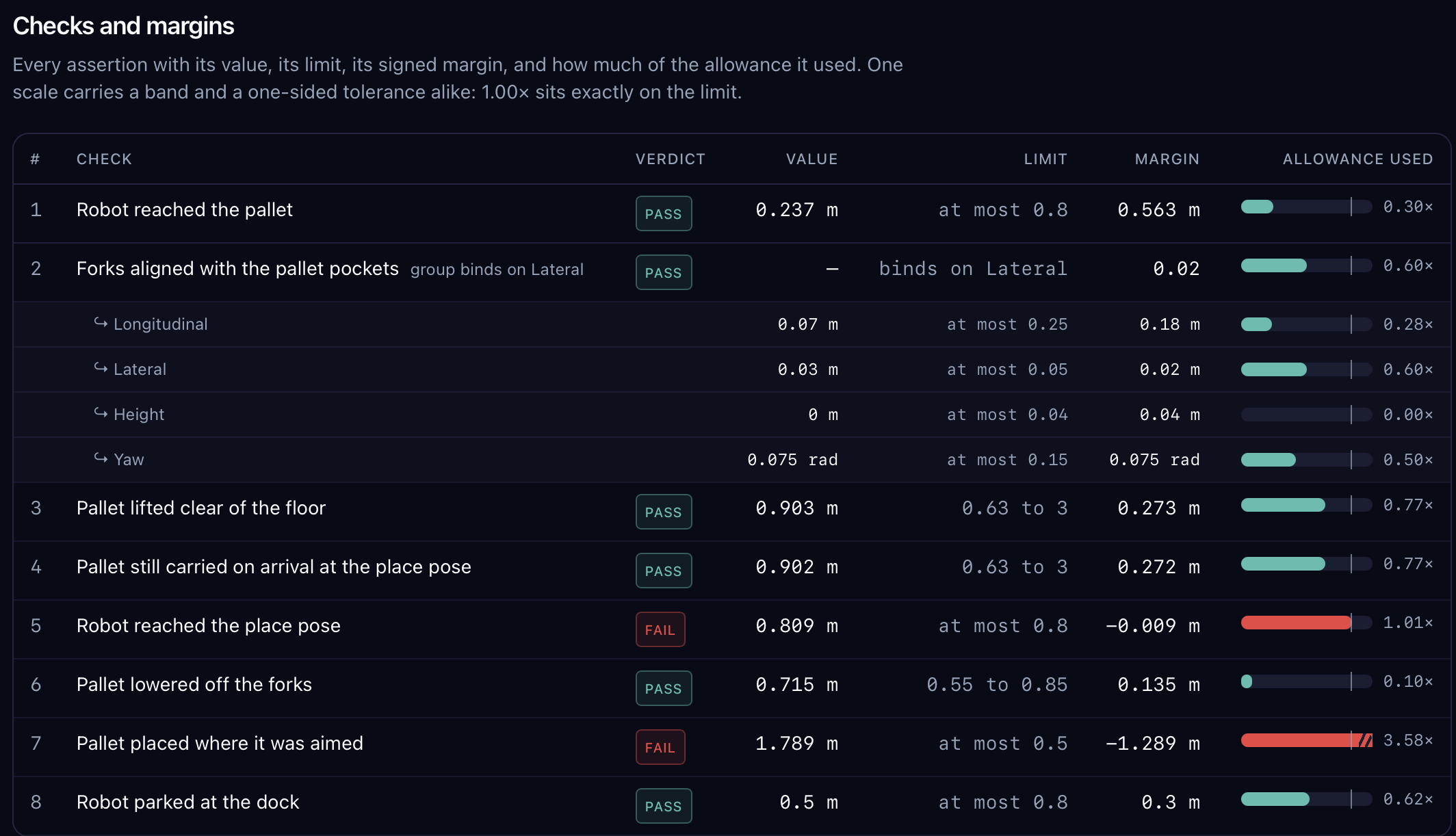
Every run is measured against the limits that matter for a mobile robot: stopping distance, clearance, placement and route fidelity. When a run finishes, the report doesn't hand you a green tick; it hands your engineers the case file.
What the run report answers
- Did it pass, and by how much?Every assertion with its measured value, its tolerance, its signed margin and a verdict, so a near miss reads differently from a comfortable pass.
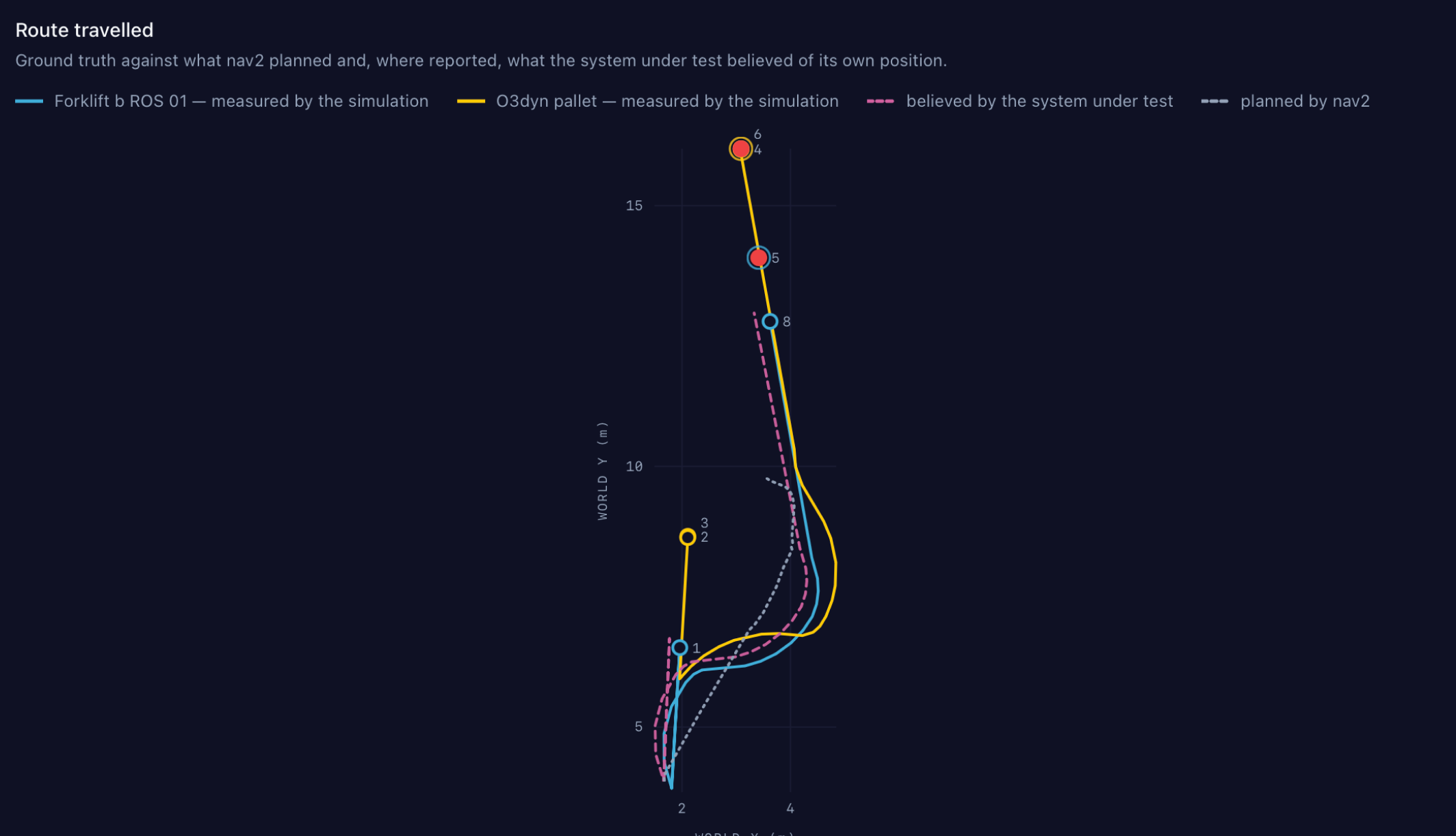
- Where did it actually go?The robot's path, ground truth from the simulation, overlaid on what nav2 planned and what the robot believed about its own position.
- What conditions was it under?The exact combination this run drew: speed, load, light, floor, sensor noise and seed, so the run can be replayed deterministically.
- Why did it fail?Root cause traced to your own rosbag data: which message, which timestamp, which decision, so your engineers start from evidence, not a symptom.
Every result is a verdict on your software as it will ship, not on a version tuned to pass.
// 05 Who on your team
Built for the people who ship the robot, and the people who answer for it.
Autonomy and simulation engineers
Keep the hard problems: the planner, the perception stack, the corner case that only you understand. Hand Forge the scene building, asset wrangling, sensor modelling and scenario scaffolding, and get back a root cause you can act on instead of a bag to dig through.
Book a technical demoTest, QA and release
Run the full suite on every release candidate, see the release-over-release diff, and ship with a graded, standards-traceable record instead of a checklist someone signed.
See the regression workflowField engineering and sales
Rebuild a prospect's site from a walkthrough video, run your robot through their busiest hour, and walk into the pilot with evidence for their floor instead of a generic demo.
Book a demo for sales teams// 06 Questions
OEM questions, answered.
What Forge does to your navigation stack, what it needs from your team, and what your engineers get back when a run fails.
Who at a robot OEM uses Forge?
Teams building autonomous forklifts, pallet movers, tuggers and goods-to-person AMRs. Autonomy and simulation engineers keep the planner, the perception stack and the corner cases, and hand Forge the scene building, asset wrangling, sensor modelling and scenario scaffolding. Test, QA and release teams run the full suite on every release candidate. Field engineering and sales rebuild a prospect's site and run the robot through it before the pilot.
Do we still need a simulation team?
Forge does not replace your simulation engineers; it takes the work that does not need them. The scene, the assets, the sensor models, the scenario scaffolding and the first pass at root cause are drafted by Forge. Your engineers review what it proposes and stay on the problems only they can solve.
What do you need from us to start?
Your robot's URDF and one site that gave you trouble. Forge imports and tunes the robot model, places and calibrates the sensors, and builds the site; your engineers check it against the real thing before anything runs.
Does Forge modify, retrain or wrap our navigation stack?
No. Forge models the vehicle and its sensors; your nav2 and ROS 2 stack connects and drives exactly as it ships. The build that drives in the field drives in the twin, so a pass in Forge is a pass for your release, not for a simulation-friendly variant.
Does our code or model have to leave our network?
No. Forge evaluates the policy as a black box over a secure link. Model weights, source code and proprietary logic stay inside your environment; Forge only exchanges the sensor inputs and control outputs needed to run the scenario.
Does the workflow change for a different vehicle?
No. The drive model and the sensor suite change; the process does not. A counterbalance forklift, a tugger in a plant, a pallet mover at a dock and a goods-to-person AMR all go through the same build, draft, run and grade loop.
How does Forge build a customer's site?
From a description or a walkthrough video. Forge lays out racking, docks, aisles, lanes and zones, names each area so scenarios can refer to it, and flags anything it is unsure about. Your engineers correct whatever does not match the real site.
What does Forge cover that a hand-written suite misses?
The six conditions that decide a deployment: people stepping out in shared aisles and doorways, dynamic obstacles left in the lane, narrow passages and precise alignment, localization under stress, degraded perception, and mixed traffic. Forge drafts each one for the site in question and proposes the variations worth running, so the suite covers more than the cases someone remembered to write.
What do we get when a run fails?
The measurement that decided it, with its limit and its signed margin. The route the robot actually took, ground truth from the simulation, against what nav2 planned and what the robot believed about its own position. The exact conditions the run drew, so it can be replayed deterministically. And a root cause traced to your own rosbag data: which message, which timestamp, which decision.
How does Forge catch regressions between releases?
The full suite runs on every release candidate and the report gives a release-over-release diff: what held, what broke and what was fixed. Failures that recur across runs and sites are reported as trends, so a quiet regression does not wait for the field to find it.
Which safety standards do the suites reference?
The Safety suite references ISO 3691-4 and ANSI B56.5, and covers people at aisle ends, doorways and crossings, speed zones and slow-downs, emergency stop and protective-field switching, and blind corners. Each result is traceable to the requirement its scenario was written against.
Can Forge test our robot alongside other vendors' robots?
Yes. The Integration suite covers right of way, crossings and deadlock with other vendors' robots and manual equipment, and VDA 5050 task handoff from a WMS or fleet manager.
Also for deployers
Putting robots to work rather than building them?
Forge also tests robots from any vendor against your site, your processes and your business case, before go-live and after every update.
Book a demo for OEMs
Bring your URDF and one site that gave you trouble.
We'll build the site, connect your stack and run the scenario with your engineers in a 30-minute session.